 Doc Summary

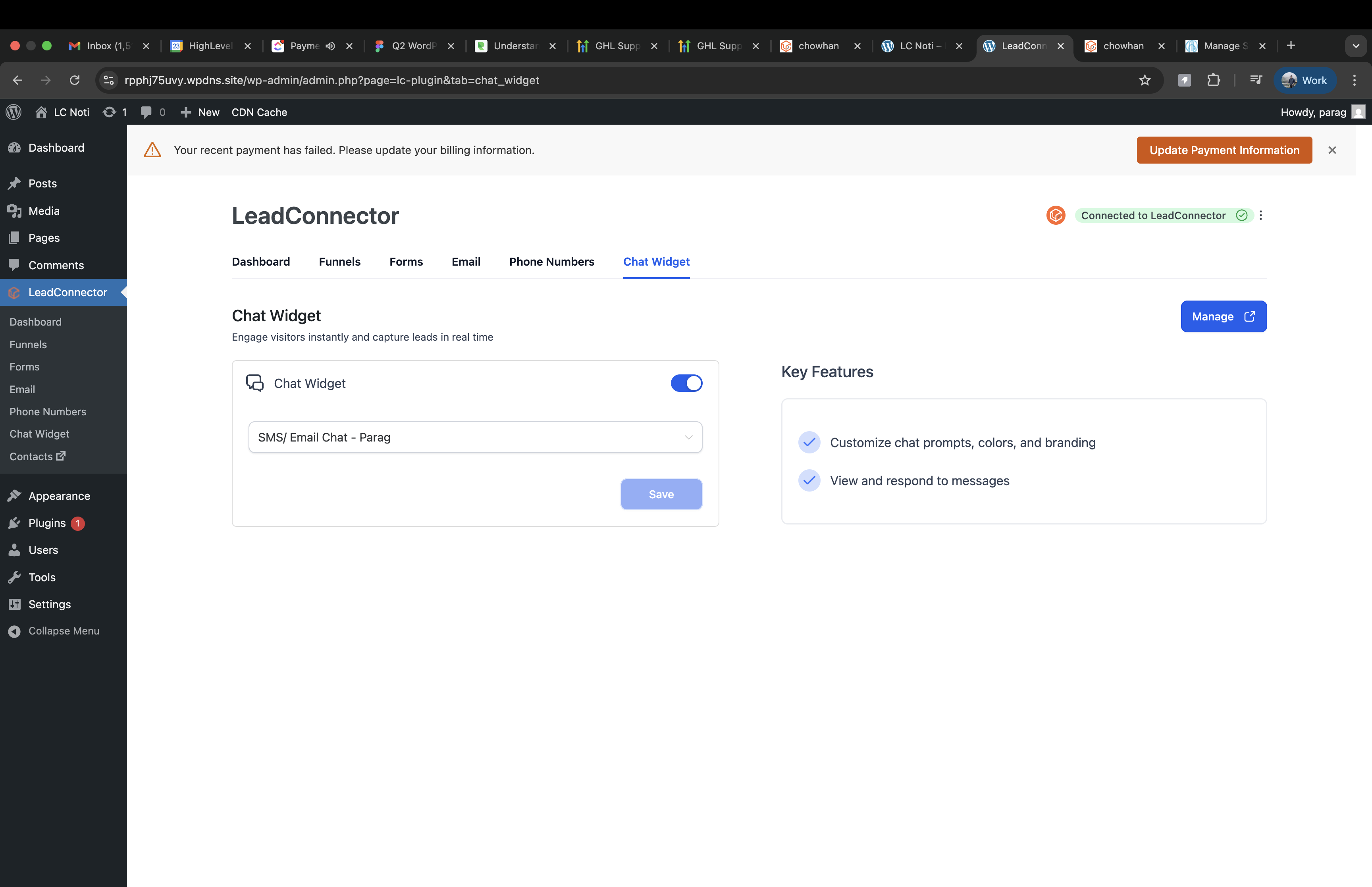
Stay ahead of billing issues by receiving real-time payment failure alerts directly within your WordPress admin dashboard. With the LC Plugin, Aiphilia users are instantly notified of payment problems where they manage their site most—inside wp-admin—so they can act fast and avoid disruptions.
TABLE OF CONTENTS
- What is Automatic Payment Failure Notification?
- Key Benefits of Automatic Payment Failure Notification
- Grace-Period Handling
- Dismiss-and-Repeat Logic
- How To Setup Automatic Payment Failure Notifications
- Frequently Asked Questions
What is Automatic Payment Failure Notification? #
Automatic payment failure notification is a built-in feature of the LC Plugin that delivers prominent, contextual billing alerts in the WordPress admin dashboard when a payment fails. This ensures users are aware of payment issues even if they don’t frequently log into the Aiphilia platform.
These alerts appear clearly within the wp-admin interface and guide users to take immediate action, reducing the risk of site disruptions due to unpaid invoices.
Key Benefits of Automatic Payment Failure Notification #
Understanding the value of this feature helps maximize its impact:
- Immediate visibility: Billing notices show up where users are already working—in the WordPress dashboard.
- Proactive grace-period handling: Users have a 3-day window to resolve payment issues before lockout.
- User-friendly experience: Alerts are dismissible but return on reload/login until resolved.
- Reduced churn: Proactively notifies users to fix issues and prevent service interruptions.
Grace-Period Handling #
The grace-period system helps ensure users aren’t caught off guard while offering a time buffer for resolution.
- Notification Display Period: For 3 days after a failed payment, the site remains functional but displays an alert.
- Actionable Prompt: The notice includes a clear call-to-action directing the user to resolve billing.
- After Grace Period: If the issue isn’t resolved in 3 days, the site lock mechanism will take effect to prevent further use.
Dismiss-and-Repeat Logic #
Notifications are designed to be helpful without being intrusive, ensuring that the user is consistently reminded.
- Dismissible Interface: Users can temporarily close the alert.
- Persistent Reappearance: The notification will return every time the dashboard is reloaded or on the next login.
- Until Resolved: Alerts only stop once the payment issue is fully resolved in the Aiphilia account.
How To Setup Automatic Payment Failure Notifications #
To ensure the feature functions correctly, the LC Plugin must be properly installed and active on the WordPress site.
Steps to Enable Notification Alerts:
- Log in to your WordPress admin dashboard.
- Navigate to Plugins > Installed Plugins.
- Ensure the LC (LeadConnector) Plugin is installed and activated.
- No further setup is needed—alerts will trigger automatically upon payment failure.
Frequently Asked Questions #
Q: Do I need to configure anything manually to enable these alerts?
A: No, once the LC Plugin is active, notifications will work automatically upon a payment failure.
Q: Will the notification show on all admin pages or just the dashboard?
A: The alert appears prominently within the admin dashboard for visibility.
Q: What happens if I ignore the alert for 3 days?
A: After 3 days, if the billing issue remains unresolved, your site will be locked until payment is resolved.
Q: Can I turn off the payment failure notice?
A: No, the alert is essential for maintaining service continuity and cannot be permanently disabled until resolved.
Q: Does this feature work if I deactivate the LC Plugin?
A: No, the LC Plugin must be active for alerts to function.
Q: Will my clients see these alerts or just admins?
A: Only WordPress users with admin access will see these payment failure notices.
Related Articles #
- LC (LeadConnector) WordPress Plugin
- WordPress Plugin and Theme Management
- Workflow Trigger – Payment Received
- Notifications inside Client Portal
- Getting Started: Migrate a WordPress Site


